


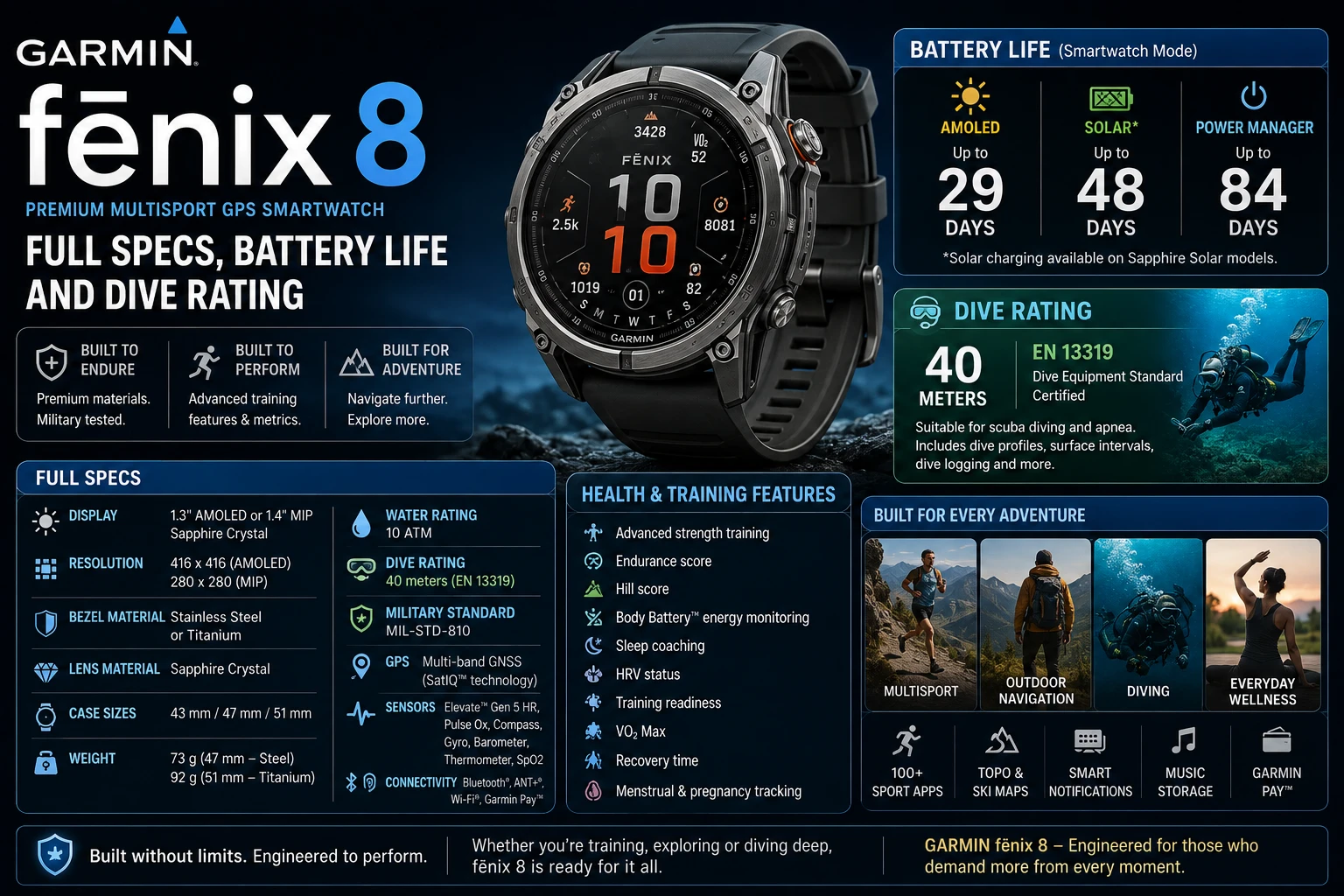
The Garmin fēnix 8 is a dive-rated multisport GPS smartwatch with a built-in speaker, microphone and LED flashlight, sold in an AMOLED version at 43, 47 and 51 mm and a solar version at 47 and 51 mm. Garmin’s suggested retail pricing started at $999.99 at launch. Battery life runs from 10 days on the 43 mm AMOLED to 48 days on the 51 mm Solar with sun exposure.
The headline change from the fēnix 7 is not the screen. It is that the case is leakproof: metal buttons sealed for a 40-metre dive rating, which is what allows Garmin to put real scuba and apnea dive modes on a watch that also runs a marathon. Everything below comes from Garmin’s own specification tables and launch materials, not from estimates.
Which fēnix 8 is which
| Model | Sizes | Display | Smartwatch battery (best case) |
|---|---|---|---|
| fēnix 8 AMOLED | 43, 47, 51 mm | AMOLED | Up to 29 days (51 mm, gesture) |
| fēnix 8 Solar | 47, 51 mm | Always-on with solar lens | Up to 48 days (51 mm, with solar) |
| fēnix 8 MicroLED | 51 mm | MicroLED | Up to 10 days (gesture) |
| fēnix 8 Pro | 47, 51 mm + MicroLED | AMOLED / MicroLED | Up to 27 days (51 mm, gesture) |
The AMOLED and Solar split is the real decision. AMOLED gives you a bright, high-resolution panel; Solar gives you an always-on transflective display that gets meaningfully better in sunlight and stretches battery life to a length no AMOLED watch matches. The Pro line, added later, is the one with cellular and satellite messaging.
Battery life, by mode
Garmin publishes battery figures per size and per display mode, and the spread between “gesture” (screen wakes on wrist raise) and “always on display” is large enough to change which watch you should buy.
fēnix 8 AMOLED
| Mode | 43 mm | 47 mm | 51 mm |
|---|---|---|---|
| Smartwatch, gesture | 10 days | 16 days | 29 days |
| Smartwatch, always on | 4 days | 7 days | 13 days |
| GPS only, gesture | 28 hrs | 47 hrs | 84 hrs |
| All satellite systems + multi-band | 21 hrs | 35 hrs | 62 hrs |
| Max battery GPS | 49 hrs | 81 hrs | 145 hrs |
| Expedition GPS | 10 days | 17 days | 31 days |
fēnix 8 Solar
| Mode | 47 mm | 51 mm |
|---|---|---|
| Smartwatch, typical use | 21 days | 30 days |
| Smartwatch, with solar | 28 days | 48 days |
| GPS only, typical | 67 hrs | 95 hrs |
| GPS only, with solar | 92 hrs | 149 hrs |
| Max battery GPS, with solar | 283 hrs | 653 hrs |
Garmin’s solar figures carry conditions worth reading: smartwatch-mode solar numbers assume all-day wear with 3 hours per day outside in 50,000 lux conditions, and the GPS solar numbers assume use outside in 50,000 lux. That is bright, direct daylight. A commuter in a northern winter will see the “typical use” column, not the solar one.
The 51 mm Solar’s 653 hours in max battery GPS mode — over 27 days of continuous tracking — is the number that makes this watch a genuine expedition tool rather than a fitness tracker with a rugged case.
Diving: what the 40-metre rating actually means
Garmin rates the fēnix 8 at 10 ATM for general water resistance — the device withstands pressure equivalent to a depth of 100 m — and separately at 4 ATM Dive, designed to comply with EN 13319, the European standard for diving accessories.
Those two ratings answer different questions. 10 ATM covers swimming, surface watersports and impact with water. The EN 13319 dive rating is what permits the watch to be used as dive equipment. Garmin’s depth sensor is specified as accurate from 0 m to 40 m, with 0.1 m resolution to 45 m, and the watch uses the Bühlmann ZHL-16C decompression model — the same algorithm family found in dedicated dive computers.
Practical limits still apply. 40 m is recreational scuba territory, not technical diving. The watch supports scuba and apnea dive activities; it does not replace training, a buddy, or a primary computer if your agency requires one.
Speaker, microphone and flashlight
Three hardware additions define day-to-day use more than any software feature:
- Speaker and microphone — make and take phone calls from the watch when paired with a compatible smartphone. Certain voice commands, such as starting a strength training activity, setting a timer or saving a waypoint, work without a phone connection.
- LED flashlight — brightness controlled from the display, with variable intensities, a red light and a strobe mode.
- Sensor guard — a physical shield over the optical sensors, addressing the most common wear point on previous fēnix generations.
The flashlight sounds like a gimmick until the first pre-dawn run. The red mode preserves night vision, and the strobe is a genuine safety feature on a roadside.
Build and environmental limits
Garmin states that all models feature leakproof metal buttons and have been tested to U.S. military standards for thermal, shock and water resistance, with an optional titanium bezel and optional scratch-resistant sapphire lens.
The operating and storage temperature range is −20 °C to 45 °C (−4 °F to 113 °F), charging is limited to 0 °C to 45 °C, and underwater operation is rated 0 °C to 40 °C. The charging window matters in winter: a watch brought in from below-freezing conditions should warm up before it goes on the cable.
The fēnix 8 Pro and satellite messaging
The Pro models are the connected tier. Garmin’s specification tables list LTE bands B3, B8 and B20 and NTN bands n255 and n256 — non-terrestrial network, meaning direct satellite connectivity from the wrist rather than through a phone or a separate inReach device.
That capability costs battery. The Pro 51 mm runs up to 27 days in smartwatch mode, but drops to 21 hours in all-satellite plus multi-band mode with LTE LiveTrack running, and 15 hours with music added on top. Cellular and satellite features on a watch are for when you need them, not for leaving on.
Who should buy which
- fēnix 8 AMOLED 47 mm — the default. 16 days of smartwatch battery, 35 hours of multi-band GPS, a screen that reads instantly indoors.
- fēnix 8 AMOLED 43 mm — for smaller wrists, accepting 10 days and 21 hours of multi-band GPS.
- fēnix 8 Solar 51 mm — for multi-day, off-grid use where charging is the constraint. 48 days in the sun, 653 hours of max-battery GPS.
- fēnix 8 Pro — only if you need cellular or satellite messaging without carrying a phone.
If a $999-and-up multisport watch is more than you need, the rugged category has cheaper entries built to the same military standards — see our guide to choosing a rugged smartwatch for how the fēnix 8 compares against the Instinct 3 and Apple Watch Ultra 3.
Frequently Asked Questions
How long does the Garmin fēnix 8 battery last?
In smartwatch mode with gesture wake, Garmin specifies up to 10 days on the 43 mm AMOLED, 16 days on the 47 mm and 29 days on the 51 mm. Always-on display roughly halves those figures. The 51 mm Solar reaches up to 30 days typical use, or 48 days with solar charging assuming 3 hours per day outside in 50,000 lux.
Can you scuba dive with the Garmin fēnix 8?
Yes, within limits. Garmin gives it a 40-metre dive-rated case designed to comply with EN 13319, with support for scuba and apnea dive activities and the Bühlmann ZHL-16C decompression model. The depth sensor is specified as accurate from 0 to 40 m. It is rated for recreational depths, not technical diving.
Does the fēnix 8 have a flashlight and speaker?
Both. Garmin lists a built-in LED flashlight with variable intensities, a red light and a strobe mode, plus a built-in speaker and microphone for taking calls through a paired smartphone. Some voice commands work on the watch with no phone connection.
What is the difference between fēnix 8 AMOLED and Solar?
The AMOLED versions come in 43, 47 and 51 mm with a bright AMOLED panel. The Solar versions come in 47 and 51 mm with an always-on display and a solar charging lens, trading screen brightness for far longer battery life — up to 48 days in smartwatch mode on the 51 mm with sun exposure.
How much does the Garmin fēnix 8 cost?
Garmin’s suggested retail pricing for the fēnix 8 Series started at $999.99 at launch, rising with size, display type and premium materials such as a titanium bezel or sapphire lens. Street prices move over time, so check Garmin or an authorised retailer for current figures rather than relying on a launch number.
The bottom line
The fēnix 8 earns its price on sealed hardware rather than software: leakproof buttons, a 40-metre EN 13319 dive rating, a real flashlight, and a speaker and mic that work for calls and offline voice commands. Pick AMOLED for the screen, Solar for the battery, Pro only if you need satellite or LTE. Read Garmin’s solar conditions before assuming you will see the solar numbers.
More on Tech2Post: how to choose a rugged smartwatch, connecting AirPods to a laptop, and the Sony Headphones Connect app rename for the other half of a training kit.
Related reading: the best smartphones for trekking to pair with it, the DJI Osmo Pocket 4, which iPhones have eSIM for travel connectivity, what latency actually means, taking screenshots on any device, and optimizing a gaming PC.
Sources: Garmin fēnix 8 Series Owner’s Manual — Specifications and Garmin — fēnix 8 Series announcement. All battery figures, water and dive ratings, temperature ranges, radio bands and pricing are taken from Garmin’s published specifications and launch materials.
